
Guide: Credit Report only
Credit Risk Report API - Getting Started Guide
This guide walks you through producing a Plend credit risk report with the Prestatech Document Engine API: create a process, upload and parse bank statements, validate the inputs, trigger the report, retrieve the result, and download the PDF.
Prerequisites
Before starting, you'll need:
- Access to the API Portal at https://api-portal.prestatech.com/
- A set up user account and active subscription. Consult with us, if you think you don't have any.
- Your subscription credentials (client_id, client_secret, subscription_key)
- OpenAPI specification for the Document Engine API
API Base URL
All API requests are made to: https://api.prestatech.com
📥 Prefer Postman? Download the client Postman collection — import it, set the collection's credential variables, and every endpoint in this guide is ready to run.
Overview
A credit risk report is built on top of a process that contains parsed bank statements and other supported files — and, optionally, additional bank-account transaction data you supply directly as JSON (POST .../bank-accounts) or connect via Open Banking.
The flow is:
- Authenticate (Step 1).
- Create a process to hold the case (Step 2).
- Upload and parse your bank statement files (Step 3).
- Validate the inputs before committing (Step 4).
- Trigger the report (Step 5) — returns immediately with a
credit_report_id; the result arrives asynchronously. - Receive the result (Step 6).
- Download the rendered PDF (Step 7).
Sequence at a glance
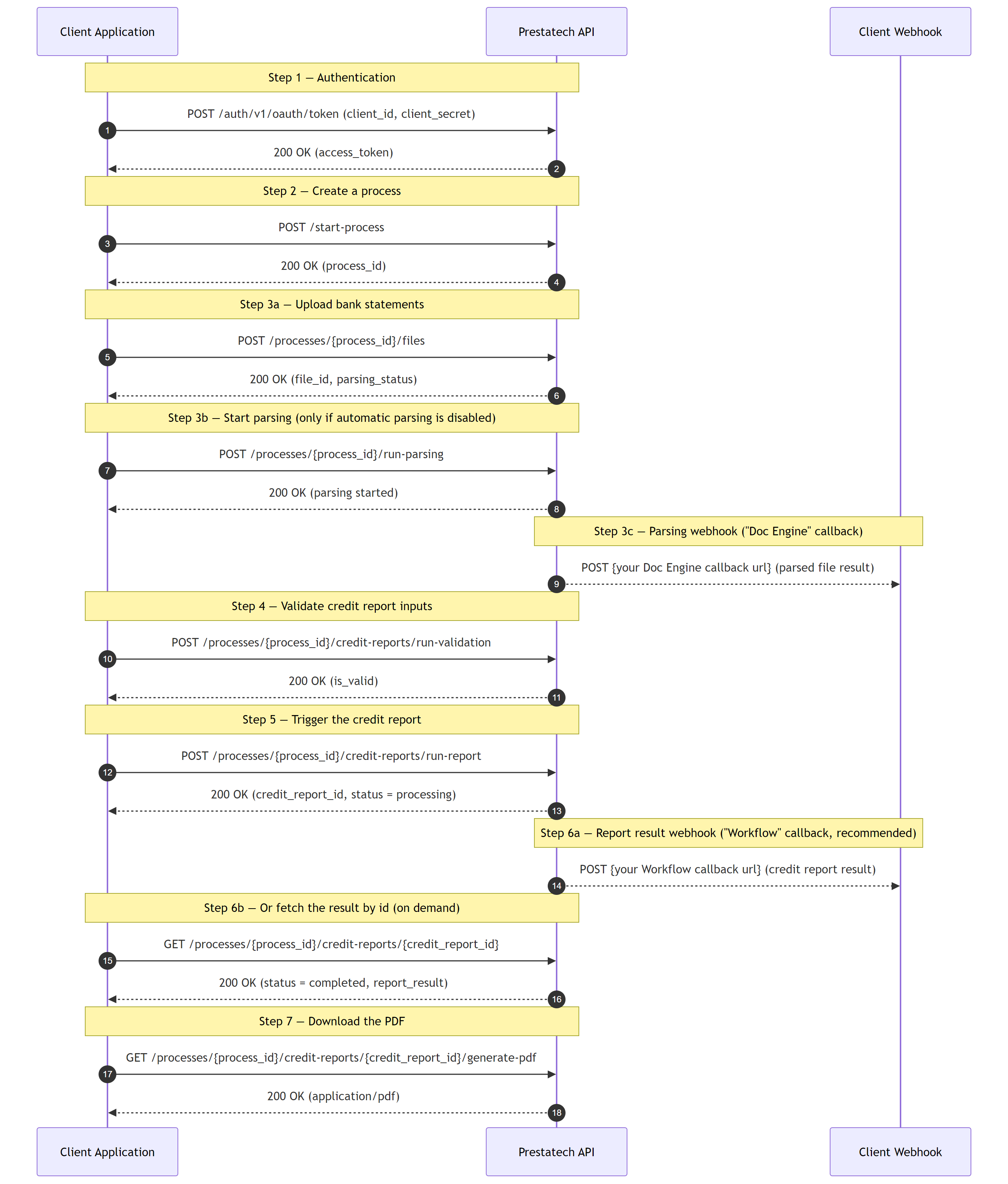
Diagram source (Mermaid)
sequenceDiagram
    autonumber
    participant C as Client Application
    participant API as Prestatech API
    participant WH as Client Webhook

    Note over C,API: Step 1 — Authentication
    C->>API: POST /auth/v1/oauth/token (client_id, client_secret)
    API-->>C: 200 OK (access_token)

    Note over C,API: Step 2 — Create a process
    C->>API: POST /start-process
    API-->>C: 200 OK (process_id)

    Note over C,API: Step 3a — Upload bank statements
    C->>API: POST /processes/{process_id}/files
    API-->>C: 200 OK (file_id, parsing_status)

    Note over C,API: Step 3b — Start parsing (only if automatic parsing is disabled)
    C->>API: POST /processes/{process_id}/run-parsing
    API-->>C: 200 OK (parsing started)

    Note over API,WH: Step 3c — Parsing webhook ("Doc Engine" callback)
    API-->>WH: POST {your Doc Engine callback url} (parsed file result)

    Note over C,API: Step 4 — Validate credit report inputs
    C->>API: POST /processes/{process_id}/credit-reports/run-validation
    API-->>C: 200 OK (is_valid)

    Note over C,API: Step 5 — Trigger the credit report
    C->>API: POST /processes/{process_id}/credit-reports/run-report
    API-->>C: 200 OK (credit_report_id, status = processing)

    Note over API,WH: Step 6a — Report result webhook ("Workflow" callback, recommended)
    API-->>WH: POST {your Workflow callback url} (credit report result)

    Note over C,API: Step 6b — Or fetch the result by id (on demand)
    C->>API: GET /processes/{process_id}/credit-reports/{credit_report_id}
    API-->>C: 200 OK (status = completed, report_result)

    Note over C,API: Step 7 — Download the PDF
    C->>API: GET /processes/{process_id}/credit-reports/{credit_report_id}/generate-pdf
    API-->>C: 200 OK (application/pdf)
The two webhook arrows are asynchronous callbacks configured in the user portal under Integrations → Webhook: the "Doc Engine" callback delivers parsed-file results (Step 3c), and the "Workflow" callback delivers the credit report result (Step 6a). Steps 6a (webhook) and 6b (fetch by id) are alternatives — webhooks are recommended; the by-id fetch is always available on demand.
Step 1: Authentication
Get Access Token
First, obtain an access token using your client credentials from the "Subscription" section in the API portal.
Request:
curl -X POST "https://api.prestatech.com/auth/v1/oauth/token" \
  -H "Content-Type: application/json" \
  -H "Ocp-Apim-Subscription-Key: YOUR_SUBSCRIPTION_KEY" \
  -d '{
    "client_id": "your-client-id",
    "client_secret": "your-client-secret"
  }'
Response:
{
  "access_token": "eyJhbGciOiJIUzI1NiIsInR5cCI6IkpXVCJ9...",
  "refresh_token": null,
  "scope": "manage:live-prestatechopenapi manage:live",
  "expires_in": 86400,
  "token_type": "Bearer"
}
Save the access_token - you'll need it for all subsequent API calls.
Step 2: Create a Process
A process serves as a logical container for files related to a single application or case. This helps distinguish between different applications.
Process Management
Beyond creating new processes, you can also:
- List processes (paginated): Use
GET /document-engine/v1/processesfor a paginated list. Optional filters:ext_application_id,space_ids,statuses,created_at_from/created_at_to, pluslimit/offset. Results are ordered bycreated_atdescending. - Get specific process: Use
GET /document-engine/v1/processes/{process_id}to retrieve a single process by its ID - Navigate a process and its sub-entities: A process is a container for several kinds of sub-entity — files, bank accounts, Open Banking accounts and credit reports. The process model summarizes each kind in two ways: a total count (
total_files,total_bank_accounts,total_open_banking_accounts,total_credit_reports) and a preview of the ten most recent items in the corresponding*_refsarray (file_refs,bank_account_refs,open_banking_account_refs,credit_report_refs). The previews are a convenience, not the full set — to page through all items of a kind, call that sub-entity's own paginated list endpoint scoped to the process. For example, for files:GET /document-engine/v1/processes/{process_id}/files?limit=20&offset=0. The other kinds follow the same pattern (/bank-accounts,/open-banking-accounts,/credit-reports).
Create a New Process
Request:
curl -X POST "https://api.prestatech.com/document-engine/v1/start-process" \
  -H "Content-Type: application/json" \
  -H "Authorization: Bearer YOUR_ACCESS_TOKEN" \
  -H "Ocp-Apim-Subscription-Key: YOUR_SUBSCRIPTION_KEY" \
  -d '{
    "ext_application_id": "app-12345",
    "options": {
      "ext_user_id": "user-67890",
      "applicant_type": "employee"
    },
    "attributes": {
      "main_applicant_name": "Mario Rossi",
      "main_tax_code": "RSSMRA80A01H501Z"
    }
  }'
attributes is optional. main_applicant_name and main_tax_code are engine-meaningful applicant attributes — useful to set up front because credit reports can fall back to them.
Response:
{
  "process_id": "0335e8c5-aab7-4391-85b1-e4c4f99dd1a0",
  "ext_application_id": "app-12345",
  "space_id": "default",
  "status": "active",
  "created_at": "2024-06-01T12:00:00Z",
  "updated_at": "2024-06-01T12:00:00Z",
  "total_files": 0,
  "total_bank_accounts": 0,
  "total_open_banking_accounts": 0,
  "total_credit_reports": 0,
  "file_refs": [],
  "bank_account_refs": [],
  "open_banking_account_refs": [],
  "credit_report_refs": [],
  "options": {
    "ext_user_id": "user-67890",
    "applicant_type": "employee"
  },
  "attributes": {
    "main_applicant_name": "Mario Rossi",
    "main_tax_code": "RSSMRA80A01H501Z",
    "source": "api"
  }
}
The total_* fields are unbounded counts; the *_refs arrays are a preview of the ten most recent items of each kind (use the dedicated list endpoints for the full paginated lists — see "Navigate a process and its sub-entities" above).
Save the process_id - you'll use it to upload bank statements and run the report.
Step 3: Upload and Parse Bank Statements
Upload your bank statement files to the process. The API automatically validates each file and may trigger parsing depending on your tenant configuration. A credit report can only consume files whose parsing_status is completed, so this step ends once parsing has finished.
This guide uses bank statements as the running example, but a report can consume any supported parsed file. The simplest way to include everything the process has is include_all_data: true when you validate and run (Step 4) — no need to enumerate file types.
Note on document_type: This field is optional. If you omit it, the API automatically detects the document type during validation. Supply it only when you want the API to assert that the detected type matches what you expect — if the uploaded file doesn't match the document_type you passed, validation reports a failure instead of silently proceeding. For bank statements the relevant types are it.bank_statement (a standard statement) and it.bank_account_movements (a movements/transaction list); the full list of accepted values is in the DocumentType schema of the OpenAPI specification.
⚠️ Upcoming document-type rename — read before hardcoding
it.bank_statement. Today bank statements use the IT-prefixed document typesit.bank_statementandit.bank_account_movements(these are the values shown throughout this guide and accepted by the API now). We are migrating document types to an open, un-prefixed catalog, after which the canonical keys becomebank_statementandbank_account_movements(theit.prefix is dropped). During the transition the API will accept both the prefixed and un-prefixed forms and may echo back either, so:
- Do not hardcode an exact-string equality check on
it.bank_statement; match on the suffix (the part after the last.) or treat the value as opaque.- Be prepared to send and receive the un-prefixed form once the migration lands. The same caution applies to every document type, not just bank statements.
Request:
curl -X POST "https://api.prestatech.com/document-engine/v1/processes/0335e8c5-aab7-4391-85b1-e4c4f99dd1a0/files" \
  -H "Authorization: Bearer YOUR_ACCESS_TOKEN" \
  -H "Ocp-Apim-Subscription-Key: YOUR_SUBSCRIPTION_KEY" \
  -F "ext_file_id=bank-statement-001" \
  -F "file=@/path/to/bank_statement.pdf"
Response:
{
  "process_id": "0335e8c5-aab7-4391-85b1-e4c4f99dd1a0",
  "ext_file_id": "bank-statement-001",
  "file_id": "6f315ea3-268c-4c79-b70b-bf76273058e4",
  "document_type": "it.bank_statement",
  "validation_result": {
    "status": "success",
    "errors": [],
    "pre_result": null
  },
  "result_path": "/processes/0335e8c5-aab7-4391-85b1-e4c4f99dd1a0/files/6f315ea3-268c-4c79-b70b-bf76273058e4",
  "parsing_status": "processing",
  "parsing_confidence": null,
  "parsing_result": null,
  "errors": []
}
Note the file_id of each uploaded statement — you'll reference these IDs when validating and triggering the report. Repeat this request for every statement file you want to include.
Understanding Validation Results
- status: one of:
success— a valid document matching the expected typefailure— the document type is not as expected, or other validation errors were detectedmerged— more than one document was detected within a single uploadunreadable— the file quality is too low, or the document is faulty/password-protectedid_doc_incomplete— an ID document is incomplete (e.g. only one side provided when both are expected); an optional check configured per request
- parsing_status: Current parsing state
Parsing Status Values
uploaded: File uploaded successfully, parsing not startedprocessing: Document is being parsed (async operation)completed: Parsing finished successfullyerror: Parsing failed
Parsing Behavior Options
Note on Parsing: Parsing is an asynchronous operation that typically takes from a few seconds to several minutes, depending on the file complexity and system load. The process follows this flow:
- Once parsing is triggered,
parsing_statusis set to"processing" - Once parsing completes successfully, the status changes to
"completed" - If parsing fails, the status becomes
"error" - The
parsing_resultfield is populated only when parsing completes successfully (parsing_status: "completed")
Option 1: Automatic Parsing
When your tenant configuration has automatic parsing enabled:
- Successfully validated files (
status: "success") automatically trigger parsing - Parsing happens asynchronously in the background
- You'll receive
parsing_status: "processing"immediately after upload - Monitor the file status or set up webhooks to get notified when parsing completes
Option 2: Manual Parsing
When automatic parsing is disabled:
- Files are only validated on upload
- You'll receive
parsing_status: "uploaded" - You must manually trigger parsing using the
/run-parsingendpoint
Manual parsing request:
curl -X POST "https://api.prestatech.com/document-engine/v1/processes/0335e8c5-aab7-4391-85b1-e4c4f99dd1a0/run-parsing" \
  -H "Content-Type: application/json" \
  -H "Authorization: Bearer YOUR_ACCESS_TOKEN" \
  -H "Ocp-Apim-Subscription-Key: YOUR_SUBSCRIPTION_KEY" \
  -d '{
    "file_ids_filter": ["6f315ea3-268c-4c79-b70b-bf76273058e4"]
  }'
Note: The file_ids_filter parameter is optional. If not specified or empty (default), the system will automatically parse all files in the process that have:
parsing_status: "uploaded"validation_result.status: "success"
Monitor Parsing Progress
Wait until each statement reaches parsing_status: "completed" before moving on. The upload response returns no parsing result — parsing runs asynchronously afterward. Learn when each statement is done via the recommended "Doc Engine" webhook (the system pushes to you) or an on-demand read of the file by id (you pull).
Webhook Method (Recommended)
Configure the "Doc Engine" callback in the user portal under Integrations → Webhook to receive automatic notifications when parsing completes. This eliminates the need for polling and provides real-time updates. (A separate "Workflow" callback delivers the credit report result later — see Step 6.)
The webhook fires once per file, not once per batch. To detect that all your statements have finished, match the incoming callbacks against the file_ids returned by /run-parsing — the batch is complete once every id has reported. (Alternatively, list the process's files with GET /processes/{process_id}/files and treat the batch as done once none are still processing.)
When parsing is finished, the system sends a POST request to your configured callback URL with a payload equivalent to the response from the GET /processes/{process_id}/files/{file_id} endpoint:
Webhook Payload Example:
{
  "process_id": "0335e8c5-aab7-4391-85b1-e4c4f99dd1a0",
  "ext_file_id": "bank-statement-001",
  "file_id": "6f315ea3-268c-4c79-b70b-bf76273058e4",
  "document_type": "it.bank_statement",
  "validation_result": {
    "status": "success",
    "errors": []
  },
  "result_path": "/processes/0335e8c5-aab7-4391-85b1-e4c4f99dd1a0/files/6f315ea3-268c-4c79-b70b-bf76273058e4",
  "parsing_status": "completed",
  "parsing_confidence": 0.98,
  "parsing_result": {
    "document_conformed": { "value": true },
    "bank_name": { "value": "Banca Example" },
    "iban": { "value": "IT60X0542811101000000123456" },
    "account_holder": { "value": "Mario Rossi" },
    "currency_code": { "value": "EUR" },
    "opening_balance": { "value": 1000.00 },
    "closing_balance": { "value": 1500.00 },
    "value_date_min": { "value": "2024-01-01" },
    "value_date_max": { "value": "2024-03-31" }
  },
  "errors": []
}
The parsing_result shape depends on the document type; the full bank-statement schema (including the transactions array) is in the OpenAPI specification.
Reading Status by ID (On-Demand)
You can call GET /processes/{process_id}/files/{file_id} at any time to sync up on a file's parsing status. Use this for on-demand checks or reconciliation — we don't recommend long-polling it to wait for parsing to finish; use the webhook above for that.
Request:
curl -X GET "https://api.prestatech.com/document-engine/v1/processes/0335e8c5-aab7-4391-85b1-e4c4f99dd1a0/files/6f315ea3-268c-4c79-b70b-bf76273058e4" \
  -H "Authorization: Bearer YOUR_ACCESS_TOKEN" \
  -H "Ocp-Apim-Subscription-Key: YOUR_SUBSCRIPTION_KEY"
The response will have the same structure as shown in the webhook payload example above.
Step 4: Validate the Credit Report Inputs
Before committing to a full run, call run-validation to surface problems with your selected inputs (account-holder mismatch across files, balance-chain breaks, missing transactions, statement-continuity gaps). This does not create a report — it just tells you whether the inputs are good enough to run one.
Provide the inputs you intend to use:
include_all_data— set totrueto include all of the process's report-suitable data: every already-parsed supported file (unparsed/in-progress files are not included) plus all bank accounts and open-banking accounts. The three id arrays below are then ignored. Defaults tofalse.file_ids— IDs of the parsed bank-statement (or other supported) files from Step 3 (already-parsed files only). Empty/omitted selects no files.bank_account_ids— IDs of bank-account transaction data you supplied directly as JSON viaPOST /processes/{process_id}/bank-accounts. Empty/omitted selects no bank accounts.open_banking_account_ids— IDs of accounts connected via Open Banking. Empty/omitted selects no open-banking accounts.report_params—account_holder(must match a holder found in the selected data),data_market(e.g.it,de),data_source(retailorcommercial), and optionaltax_code,loan_period,requested_loan_amount,overdraft_limit.
Choosing inputs: either set
include_all_data: trueto use everything the process has, or leave itfalseand list exactly the ids you want — an empty/omitted array selects none of that kind. This lets you pick anything from zero inputs up to all of them, explicitly.
Request:
curl -X POST "https://api.prestatech.com/document-engine/v1/processes/0335e8c5-aab7-4391-85b1-e4c4f99dd1a0/credit-reports/run-validation" \
  -H "Authorization: Bearer YOUR_ACCESS_TOKEN" \
  -H "Ocp-Apim-Subscription-Key: YOUR_SUBSCRIPTION_KEY" \
  -H "Content-Type: application/json" \
  -d '{
    "include_all_data": true,
    // To pick specific inputs instead, set include_all_data to false and list ids
    // (file_ids covers already-parsed files only):
    // "file_ids": ["6f315ea3-268c-4c79-b70b-bf76273058e4"],
    // "bank_account_ids": [],
    // "open_banking_account_ids": [],
    "report_params": {
      "account_holder": "Mario Rossi",
      "data_market": "it",
      "data_source": "retail",
      "tax_code": "RSSMRA85C15H501Z",
      "loan_period": null,
      "requested_loan_amount": null,
      "overdraft_limit": null
    }
  }'
Response:
{
  "is_valid": true,
  "account_holder_check": {
    "selected_matches_any_from_files": true,
    "acc_holders_from_files_are_same": true,
    "selected_account_holder": "Mario Rossi"
  },
  "data_details": {
    "elems": [
      {
        "id": "6f315ea3-268c-4c79-b70b-bf76273058e4",
        "type": "file",
        "account_holder": "Mario Rossi",
        "normalized_account_holder": "mario rossi",
        "account_holder_mismatch": false,
        "iban": "IT60X0542811101000000123456",
        "has_balance_mismatch": false,
        "is_blocking_report": false
      }
    ]
  }
}
Check is_valid before proceeding. The per-input data_details.elems[].is_blocking_report flag tells you exactly which input would stop the report (e.g. a file with no transactions). The full response also includes detailed balance_mismatch_check / continuity_check blocks — omitted here for brevity; see the CreditReportValidationModel schema in the OpenAPI specification.
Step 5: Trigger the Credit Report
Once validation is satisfactory, call run-report with the same request body as run-validation. The endpoint re-runs validation server-side and, if it passes, creates a credit report artifact in processing status and returns immediately with its credit_report_id. The actual scoring runs asynchronously — the response does not contain the finished report.
Request:
curl -X POST "https://api.prestatech.com/document-engine/v1/processes/0335e8c5-aab7-4391-85b1-e4c4f99dd1a0/credit-reports/run-report" \
  -H "Authorization: Bearer YOUR_ACCESS_TOKEN" \
  -H "Ocp-Apim-Subscription-Key: YOUR_SUBSCRIPTION_KEY" \
  -H "Content-Type: application/json" \
  -d '{
    "include_all_data": true,
    // To pick specific inputs instead, set include_all_data to false and list ids
    // (file_ids covers already-parsed files only):
    // "file_ids": ["6f315ea3-268c-4c79-b70b-bf76273058e4"],
    // "bank_account_ids": [],
    // "open_banking_account_ids": [],
    "report_params": {
      "account_holder": "Mario Rossi",
      "data_market": "it",
      "data_source": "retail",
      "tax_code": "RSSMRA85C15H501Z",
      "loan_period": null,
      "requested_loan_amount": null,
      "overdraft_limit": null
    }
  }'
Response:
{
  "credit_report_id": "9a8b7c6d-5e4f-3a2b-1c0d-9e8f7a6b5c4d",
  "process_id": "0335e8c5-aab7-4391-85b1-e4c4f99dd1a0",
  "created_at": "2024-06-01T12:15:00Z",
  "updated_at": "2024-06-01T12:15:00Z",
  "status": "processing",
  "report_params": {
    "account_holder": "Mario Rossi",
    "data_market": "it",
    "data_source": "retail",
    "tax_code": "RSSMRA85C15H501Z"
  },
  "attributes": {
    "is_monitored": false
  },
  "validation": { "is_valid": true },
  "report_result": null
}
Save the credit_report_id. A 400 here means server-side validation failed (re-run validation as in Step 4 to see which inputs are blocking); the report is not created in that case.
Credit Report Status Values
processing— report triggered, result not yet receivedcompleted— scoring finished successfully;report_resultis populatedterminated— the workflow was terminatederror— scoring failed, or one or more steps errored
Step 6: Receive the Report Result
Scoring is asynchronous (typically seconds to a few minutes). There are two ways to get the finished report.
Webhook Method (Recommended)
Configure the "Workflow" callback in the user portal under Integrations → Webhook. It delivers credit report results — distinct from the "Doc Engine" callback that delivers parsed-file results (used in Step 3). Set the "Workflow" callback URL to receive a POST when a report finishes.
When the report completes, the system POSTs the full credit report (the same shape as GET .../credit-reports/{credit_report_id} — see below) to your configured URL, with status set to completed (or error / terminated on failure).
Fetching by ID (Polling — Not Recommended)
You can always fetch the current state of a report by its ID at any time. Continuous polling is not recommended — prefer the webhook above — but a by-ID fetch is the right call to retrieve the actual result on demand (e.g. after receiving the callback, or to re-read a stored report). Poll only if you cannot receive webhooks, and back off between requests until status is no longer processing:
Request:
curl -X GET "https://api.prestatech.com/document-engine/v1/processes/0335e8c5-aab7-4391-85b1-e4c4f99dd1a0/credit-reports/9a8b7c6d-5e4f-3a2b-1c0d-9e8f7a6b5c4d" \
  -H "Authorization: Bearer YOUR_ACCESS_TOKEN" \
  -H "Ocp-Apim-Subscription-Key: YOUR_SUBSCRIPTION_KEY"
Response (completed):
{
  "credit_report_id": "9a8b7c6d-5e4f-3a2b-1c0d-9e8f7a6b5c4d",
  "process_id": "0335e8c5-aab7-4391-85b1-e4c4f99dd1a0",
  "created_at": "2024-06-01T12:15:00Z",
  "updated_at": "2024-06-01T12:16:30Z",
  "status": "completed",
  "report_params": {
    "account_holder": "Mario Rossi",
    "data_market": "it",
    "data_source": "retail"
  },
  "attributes": { "is_monitored": false },
  "validation": { "is_valid": true },
  "report_result": {
    "srg": { "...": "scoring output block" }
  },
  "used_files": [
    {
      "file_id": "6f315ea3-268c-4c79-b70b-bf76273058e4",
      "ext_file_id": "bank-statement-001",
      "document_type": "it.bank_statement",
      "parsing_status": "completed"
    }
  ],
  "used_bank_accounts": [],
  "used_open_banking_accounts": []
}
You can also list all reports for a process with GET /processes/{process_id}/credit-reports.
Step 7: Download the Report PDF
Once the report's status is completed, render it as a PDF. The langCountryCode query parameter selects the locale (e.g. it, de); if omitted it falls back to the report's data market, then to it.
Request:
curl -X GET "https://api.prestatech.com/document-engine/v1/processes/0335e8c5-aab7-4391-85b1-e4c4f99dd1a0/credit-reports/9a8b7c6d-5e4f-3a2b-1c0d-9e8f7a6b5c4d/generate-pdf?langCountryCode=it" \
  -H "Authorization: Bearer YOUR_ACCESS_TOKEN" \
  -H "Ocp-Apim-Subscription-Key: YOUR_SUBSCRIPTION_KEY" \
  --output credit_report.pdf
The response body is the PDF file (application/pdf). A 400 means the report is not yet completed or its result is missing the required scoring data — wait for completion (Step 6) before requesting the PDF.
Step 8: Archive a Process
Once you have completed processing a case and no longer need to make changes, you can archive the process. Archiving makes a process read-only, preventing any further modifications while preserving all data for retention purposes.
Processes have a status field that indicates their current state:
active: The process can be modified (upload files, run parsing, run the report)archived: The process is read-only - you can only read data, no modifications or actions are allowed
Request:
curl -X POST "https://api.prestatech.com/document-engine/v1/processes/0335e8c5-aab7-4391-85b1-e4c4f99dd1a0/archive" \
  -H "Authorization: Bearer YOUR_ACCESS_TOKEN" \
  -H "Ocp-Apim-Subscription-Key: YOUR_SUBSCRIPTION_KEY"
Response:
{
  "process_id": "0335e8c5-aab7-4391-85b1-e4c4f99dd1a0",
  "ext_application_id": "app-12345",
  "status": "archived",
  "created_at": "2024-06-01T12:00:00Z",
  "updated_at": "2024-06-01T13:00:00Z",
  "file_refs": [
    {
      "file_id": "6f315ea3-268c-4c79-b70b-bf76273058e4",
      "ext_file_id": "bank-statement-001",
      "validation_status": "success",
      "parsing_status": "completed",
      "document_type": "it.bank_statement"
    }
  ],
  "options": {
    "ext_user_id": "user-67890",
    "applicant_type": "employee"
  }
}
Misc: Best Practices
- Use meaningful external IDs: Use your own application and file IDs for easier tracking
- Set up both callbacks: Configure the "Doc Engine" callback for parsed-file results (Step 3) and the "Workflow" callback for credit report results (Step 6) to avoid polling
- Handle async operations: Both parsing and report scoring are asynchronous - design your workflow accordingly
- Only run a report on completed parsing: A credit report consumes only files whose
parsing_statusiscompleted - Validate before triggering: Use
run-validationto catch input problems before committing to a full run - Monitor quotas: Be aware of your parsing quotas and limits
- Error handling: Implement proper error handling for all API calls
Next Steps
For detailed API reference, consult the OpenAPI specification.